To support networked configurations, a TOC upload is required to inform the Fixed Gateway which panel numbers are accessible on the network.
Disable Sounders, Zone are not reported by the panel.
Battery Disconnected (shown as Charger fault) is not reported by the panel.
Silence Buzzer and Silence Sounders report as the same event but at different times related to which button is pressed.
Equipment required
From Nimbus
-
A Nimbus Connect or Fixed Gateway device
-
Fixed Gateways must be running firmware v3.50.79 or newer
-
From the panel manufacturer/3rd party
-
A GFE INT-RS232 interface
-
3 core screened data cable
Panel configuration
-
Follow the manufacturers instructions to install the INT-RS-232 interface in the panel.
-
Access the Installer Access Level and navigate to menu 8-5-6 BMS Setup.
-
For CH1 or CH2 which the INT-RS-232 interface is connected to set to ODYSSEY protocol (ADD-01)
-
If installing against a network of panels, upload the panel configuration file to Nimbus as a ToC before proceeding
Wiring
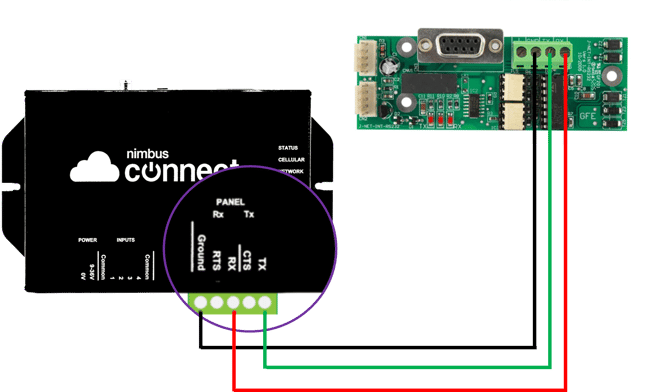
Using 3 core screened data cable, wire as follows:
| INT-RS232 interface | Nimbus RS232 |
| Ground | Ground |
| Tx | Rx |
| Rx | Tx |