Equipment required
From Nimbus
-
A Nimbus Connect or Fixed Gateway device
From the panel manufacturer/3rd party
-
3 core screened data cable
-
A Morley DXc RS232 card (part no 795-122)
Panel configuration
-
Install the Morley DXc RS232 card according to the manufacturers instructions
-
Configure the panel
-
Press [OK]
-
Select [5 Action]
-
Enter Level 3 password
-
Select [7 Commission Menu]
-
Press [OK]
-
Select [1 General]
-
Select [2nd Serial Port]
-
Serial Port Settings:
-
Set Serial Port to [TPP]
-
Set Baud to [9600]
-
Set Monitor Link to [No]
-
Set Remote Control to [No]
-
-
Wiring
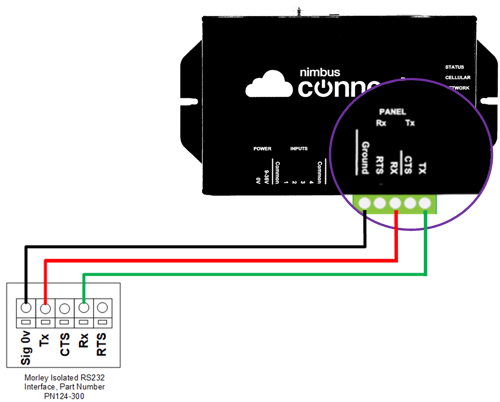
Using 3 core screened data cable wire to the Nimbus RS232 as follows.
| RS232 card | Nimbus RS232 |
| 0V | Ground |
| Tx | Rx |
| Rx | Tx |