Equipment required
From Nimbus
-
A Nimbus Connect or Fixed Gateway device
From the panel manufacturer/3rd party
- 3 core screened data cable
Panel configuration
-
Press the Main Menu button
-
PROGRAM/ALTER STATUS
-
Enter engineer code
-
PANEL PROGRAM MENU
-
SUPERVISION
-
Press PRINTER button until the display shows 80-COLUMN SUPERVISED
-
ACCEPT
-
NOTE - Ensure that you take a new configuration download from the panel (or make the above change in the configuration software). Any future configuration uploads can cause this change to be lost and the panel to stop reporting events to Nimbus.
Wiring
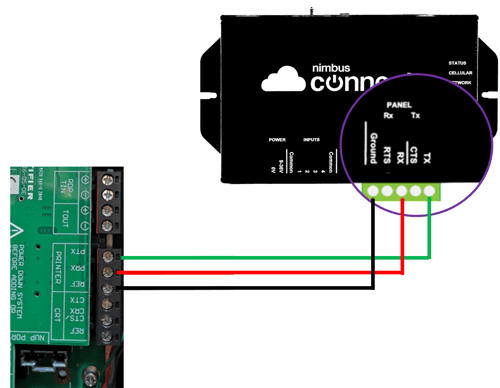
Using 3 core screened data cable wire to the Nimbus RS232 as follows.
| Printer RS232 | Nimbus RS232 |
| REF | Ground |
| PRX | Tx |
| PTX | Rx |