
This article explains how to conduct weekly tests while using Nimbus. You may also find the below article useful:
Automated weekly testing reports
Users can be subscribed to receive weekly testing reports that will be sent in the event a weekly test has NOT been performed, or a device has failed testing.
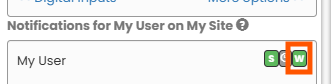
To subscribe a user to these reports, select both the user and relevant equipment from "Sites & Devices", ensuring both the W notification is selected as below.
The Weekly Test log
Weekly test data can also be viewed on an individual equipment. Navigate to the Dashboard in the Web Portal, find and click on the relevant equipment name. On the next page, select Weekly Testing to review the log.
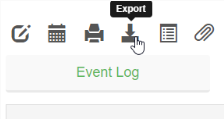
From the toolbar you can also select Export to download an Excel summary of the current period (note, you can also select historic periods from the same toolbar).
Note that, in the event a weekly test is missed, this will show in the Weekly Test Log dated Sunday of that week, regardless of what day the test is scheduled for.