
Equipment required
From Nimbus
- A nimbusGo device connected to Nimbus Digital App.
- A 2M Adapter Lead (part no 201-101-01).
- An Advanced MxPro/BMS Panel Adapter (part no 201-105-01).
From the panel manufacturer/3rd party
- n/a
Panel/BMS configuration
- Ensure the panel is not in commissioning mode.
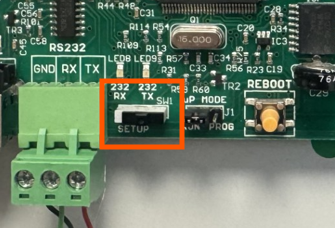
- Ensure the BMS Interface test switch is in the off position (located next to the RS232 port as below).
Panel/BMS connections
Connect nimbusGo to the RS232 connections on the interface via the 2m Adapter Lead and Advanced MxPro/BMS Panel Adapter.
You will now see the panel LED on nimbusGo turn green, and "good" panel comms will be indicated in Nimbus Digital App.
Learn more: Conducting a service visit