
Equipment required
From Nimbus
- A nimbusGo device connected to Nimbus Digital App.
- A 2M Adapter Lead (part no 201-101-01).
- A Multi Panel (9 Pin D Male) Panel Adapter (part no 201-102-01).
From the panel manufacturer/3rd party
- Panel firmware 2.7.19.7 EN54 (EU) / 2.06.000 (ANZ) or later.
Panel configuration
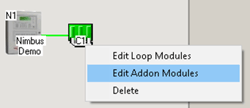
Using the Ampac Config Manager Plus software, edit the Panel configuration for “Add-on Modules”, setting the Type field for Comms2 to “Nimbus”.
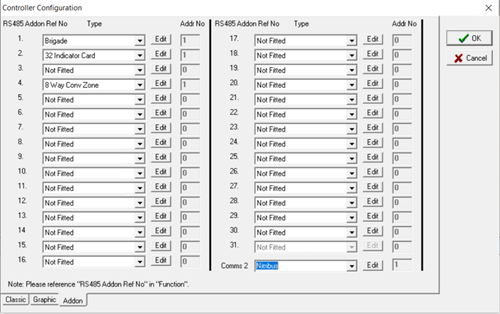
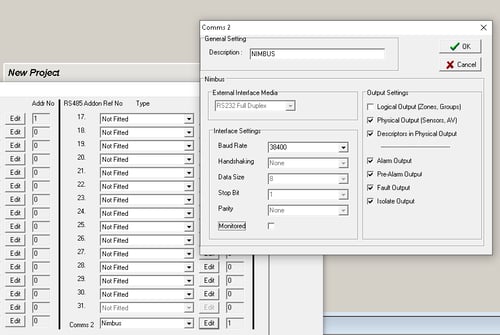
Click "Edit", for Comms2, (to the right of the Type field) and ensure the "Monitored" parameter is NOT ticked, to prevent the Panel generating a fault when the nimbusGo is not connected.
When the panel is in Walk Test Mode it will not output events.
The FireFinder (Plus) will report the most common events to Nimbus, however the following events are not output, consequently Nimbus cannot track:
- Silence
- Mute
- Evacuate
How input channels are handled
In a loop device channel configuration the Device Cnfg effects how these are handled by Nimbus, these override the loop Device Cnfg:
- Inactive - not reported to Nimbus
- General - not reported to Nimbus
- Latching Alarm - reported to Nimbus as FIRE ALARM
- Non-Latching Alarm - reported to Nimbus as FIRE ALARM
- Fault - reported to Nimbus as FAULT
Panel connections
Connect nimbusGo to the COM2 port, found on the Display Board on the inside of the panel door, via the 2m Adapter Lead and Male D Panel Adapter.
You will now see the panel LED on nimbusGo turn green, and "good" panel comms will be indicated in Nimbus Digital App.
Learn more: Conducting a service visit