
Equipment required
From Nimbus
From the panel manufacturer/3rd party
- A USB-A to USB-B cable.
Panel configuration
None required.
Panel connections
Connect nimbusGo to the USB programming port on the front panel display card using a USB-A to USB-B cable. This port is located on the inside of the panel door and not to be confused with the USB port located on a BMS/Network Card, if installed.
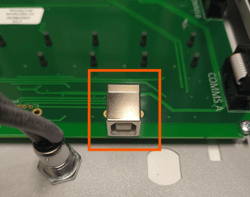
You may need to trigger an event to initialise panel communications.
You should connect to each node you are testing with the nimbusGo device to ensure output as events are not always reported across the network.
Learn more: Conducting a service visit